As a pivotal software engineer at InnCreTech, I was at the forefront of developing a cutting-edge Business Intelligence (BI) module. This module became a cornerstone of our AI-powered data and analytics platform, architected to empower businesses to transcend basic reporting and unlock actionable insights. My contributions were central to delivering a BI solution that seamlessly blends traditional BI strengths with transformative AI capabilities.
System Architecture Overview
A key challenge was designing a system that was both powerful and maintainable, separating concerns to allow for independent scaling and development. We chose a microservices-oriented architecture.
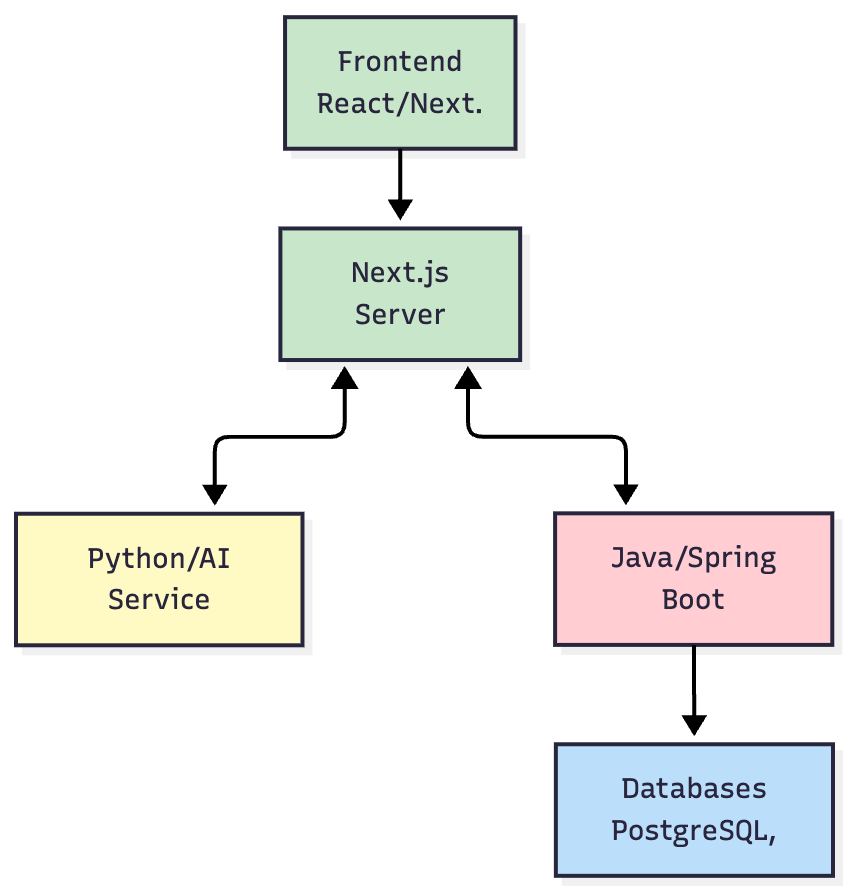
Architectural Diagram:
Separation of Concerns:
- Frontend (Next.js): A highly interactive client application responsible for all rendering and user interaction.
- Next.js Server (BFF): Acts as a Backend-for-Frontend, aggregating data from downstream services and server-rendering pages for optimal performance.
- Python/AI Service: All AI-related logic is isolated here. This allows us to leverage Python's rich AI/ML ecosystem (like LangChain) and scale the AI workload independently from the core application logic.
- Java/Spring Boot Core Services: The workhorse of the platform, handling core business logic, user management, permissions, and orchestrating data queries. Its robustness and strong typing make it ideal for these critical tasks.
This separation allowed our frontend, backend, and AI teams to work in parallel and deploy updates independently, significantly increasing our development velocity.
Performance & Scalability by Design
We anticipated the need to handle large datasets and a growing user base from the start.
Frontend Rendering Performance:
Initial benchmarks for rendering multiple complex charts were critical. We tested against various data volumes to ensure a fluid user experience.
| Data Points per Chart | Avg. Render Time (ms) | P95 Render Time (ms) |
|---|---|---|
| 10,000 | 120ms | 180ms |
| 50,000 | 450ms | 600ms |
| 100,000 | 980ms | 1300ms |
These results were achieved through virtualized rendering for large tables and intelligent aggregation on the backend before sending data to the client.
Backend Scalability:
- Stateless Services: All backend services (Java and Python) were designed to be stateless, allowing us to scale them horizontally by simply adding more container instances.
- Asynchronous Job Processing: For long-running queries or data refreshes, we used a message queue and background workers to process these jobs asynchronously, preventing the main application threads from being blocked.
- Containerization: The entire system was containerized using Docker and orchestrated with Kubernetes (via GKE), enabling automated scaling and deployment.
Technical Deep Dives: Engineering Complex Features
Here’s a look at the engineering behind some of the most complex features.
1. Deep Dive: Secure Custom SQL for BI Workbooks
Problem: Power users needed the ability to write their own SQL queries to explore data. This introduced significant security (SQL injection) and performance (runaway queries) risks.
Solution: I designed a multi-layered solution to enable custom SQL execution safely.
- Security (SQL Injection Prevention): Instead of executing raw SQL, we parsed the user's query into an Abstract Syntax Tree (AST). We then validated the AST against a strict allow-list of SQL commands (e.g.,
SELECT,JOIN,GROUP BY) and functions. Any disallowed operations (e.g.,DROP,UPDATE) would invalidate the query, completely eliminating injection risks. - Performance (Preventing Runaway Queries):
- Resource Sandboxing: Queries were executed in a sandboxed environment with limited CPU and memory.
- Automatic
LIMIT: We automatically appended aLIMIT 10000clause to all user-written queries to prevent accidental full table scans. - Query Timeouts: A hard timeout (e.g., 60 seconds) was enforced at the execution layer. Any query exceeding this limit was automatically killed.
2. Deep Dive: Architecting Drill-Down Journeys
Problem: Users often got lost when drilling down into data. They needed a guided, repeatable path to explore hierarchical or related data.
Solution: I architected a system to define and execute these "journeys."
- Data Structure: The journey paths were defined in a JSON configuration stored in our metadata database. This structure defined the sequence of drill-down steps, the columns to be used, and the desired chart type for each step.
- State Management: As a user drilled down, the state of their journey (current step, applied filters) was managed on the frontend using React's Context API. This context was passed with each subsequent query to the backend, which would then return the data for the next "draft" widget in the predefined path.
3. Deep Dive: The Real-Time Alerting System
Problem: Users needed to be proactively notified when their key metrics crossed important thresholds, without having to constantly check their dashboards.
Solution: I designed and implemented a three-part, event-driven alerting system.
- Scheduler: A cron-based scheduler service was built to trigger alert checks at user-defined intervals (e.g., every hour, every day at 9 AM).
- Condition Evaluation Engine: When a job was triggered, the engine would execute the associated query. It would then compare the result against the alert's condition (e.g.,
value > 1000). - Notification Pipeline: If the condition was met, a notification event was published to a message queue. Separate consumer services would then deliver the notifications through different channels (e.g., email, UI notifications, webhooks), making the system easily extensible.
Core Features: From Problem to Solution
1. Interactive Dashboards & Real-Time Visualization
Problem: Business leaders needed a single source of truth to monitor performance but were stuck with static, outdated reports.
Solution: I engineered a dynamic dashboarding system that allows users to create and customize dashboards with real-time KPIs, providing an immediate pulse on performance. The dashboards are highly interactive, enabling users to effortlessly drill down into data, apply sophisticated filters I developed, and explore trends from multiple perspectives.
2. Advanced Data Visualization Suite
Problem: Basic charts were not enough to tell a compelling data story or uncover complex patterns.
Solution: To ensure data is not just presented but understood, I implemented a diverse array of visualization widgets, including:
- Foundational Charts: Highly configurable Bar, Line, Area, Pie, and Donut charts.
- Specialized Visualizations: Advanced widgets including KPIs with period comparison, Scatter Plots, Packed Bubble Charts, Funnel Charts, and Tree Maps.
- Data-Intensive Tables: Powerful Tables and Pivot Tables with an innovative Tree View option, allowing users to dynamically summarize and explore hierarchical data.
3. Self-Service BI Empowerment
Problem: Business users were dependent on IT or data analysts for even minor changes to reports, creating a significant bottleneck.
Solution: I championed a self-service model by designing intuitive, no-code workflows for widget creation, dashboard assembly, and the creation of custom calculations (formulas) directly in the UI. This empowerment was a key factor in the platform's adoption and success.